


📦 Lieferzeit: 7-15 Tage
Durch den Direktversand können wir hochwertige Produkte zu günstigen Preisen anbieten.
📷 EMEET C60E – 2K / 1440P Autofokus USB-Webcam für Videoanrufe, Meetings & Streaming
📷 EMEET C60E – 2K / 1440P Autofokus USB-Webcam für Videoanrufe, Meetings & Streaming
🎥 Kristallklare Bildqualität in 2K / 1440P
Die EMEET C60E liefert gestochen scharfe Aufnahmen in bis zu 1440P / 2K und sorgt damit für professionelle Darstellung bei Videoanrufen, Online-Meetings, Streaming oder Unterricht.
Der hochwertige CMOS-Bildsensor garantiert klare Details, lebendige Farben und hervorragende Helligkeit – selbst bei schwierigen Lichtverhältnissen.
Ideal für:
-
Home-Office
-
Zoom & Teams
-
Streaming & YouTube
-
Online-Unterricht
-
Social Media Content
🎯 Autofokus für perfekte Schärfe
Dank Autofocus-Technologie stellt die Kamera automatisch und präzise auf dein Gesicht scharf – egal, ob du dich bewegst oder Gegenstände präsentierst.
Vorteile:
-
Stets klare, saubere Aufnahmen
-
Kein manuelles Nachjustieren
-
Professionelle Darstellung
💻 Plug & Play – sofort einsatzbereit
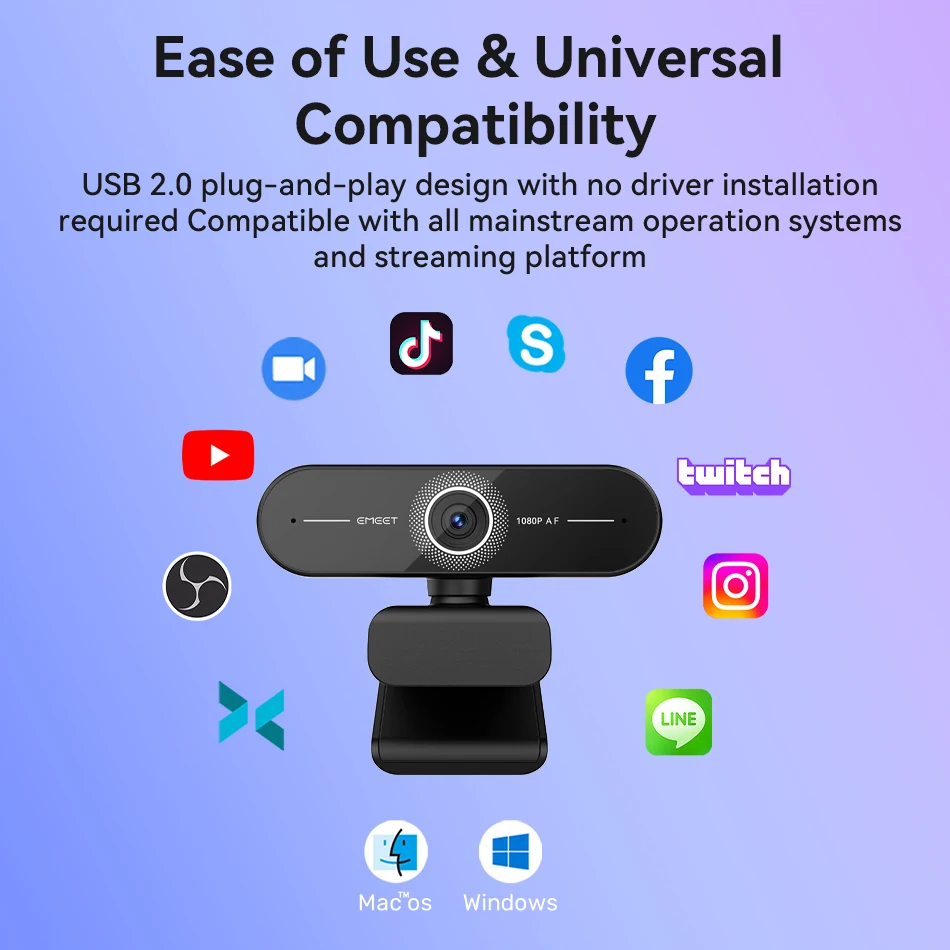
Keine Treiber, keine Installation:
Einfach per USB anschließen und direkt loslegen.
Kompatibel mit:
-
Windows
-
macOS
-
Linux
-
Laptops & Desktop-PCs
-
Smart TVs mit USB
🔊 Ideal für Videoanrufe & Konferenzen
Perfekt für Home-Office, Business-Meetings, Workshops oder Chats mit Freunden & Familie.
📦 Lieferumfang
-
1× EMEET C60E Webcam
-
1× USB-Anschlusskabel
-
1× Benutzeranleitung
⭐ Warum Nutzer diese Webcam lieben
✔ Scharfe 2K/1440P Bildqualität
✔ Autofokus für perfekte Schärfe
✔ Plug & Play über USB
✔ Professionell für Meetings & Streaming
✔ Kompakt, modern und zuverlässig
📊 Technische Daten (Specifications)
-
Marke: EMEET
-
Modell: C60E
-
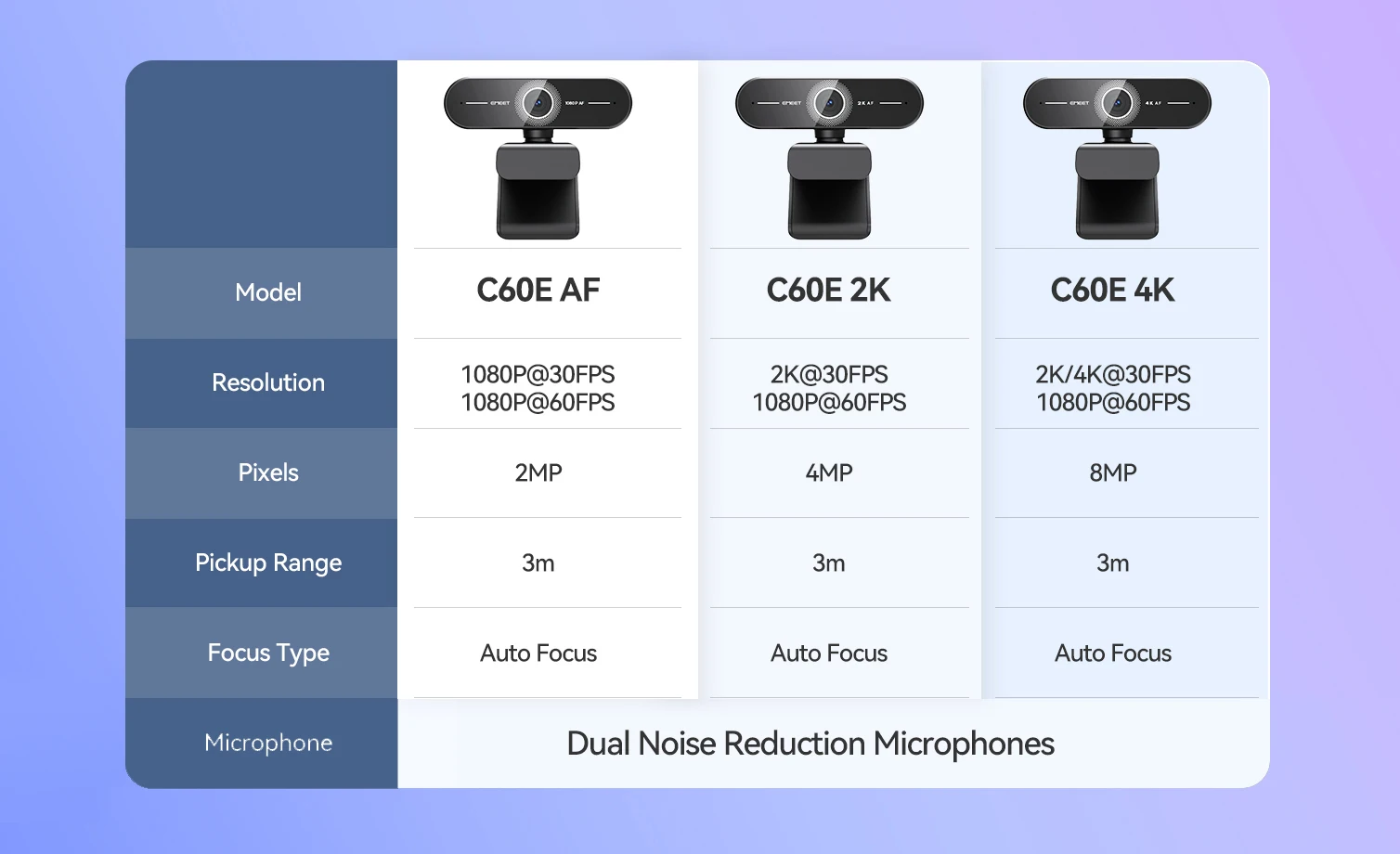
Max. Videoauflösung: 1920×1080 (1080p) / 1440p Fotomodus
-
Sensor: CMOS
-
Autofokus: Ja
-
Anschluss: USB
-
Pixel: 3 Megapixel
-
Zertifikate: CE, FCC
-
Herkunft: Mainland China
Description:
Crystal Clear Presence: The ultra-clear resolution of this PC webcam ensures sharp clarity, making a lasting impression in everyhigh-quality video call with peers or superiors.
Fast AutoFocus: Enjoy stable focusing in various scenarios with fast automatic focusing technology.
Dual Al Noise-Cancelling Mics:Enhance communication inconference calls and remote teaching with built-in dual microphones featuring noise-suppressing algorithms.
Privacy Assurance: We prioritize your privacy, and our incudedprivacy cover ensures it.
Compatibility and Versatility:Seamlessly works across multipleplatforms, induding Windows, macOS, Android Ty and Linux.Ideal for popular communication software such as Zoom, Teamsand Skype.
Beyond Clear Boundaries
A premium HD webcam with rapid autofocus, offering Full HD resolution, dual noise-canceling microphones, underscored by seamless plug-and-play functionality

Crystal Clear Presence
The ultra-clear resolution of this PCwebcam ensures sharp clarity, making a lasting impression in everyhigh-quality video call with peers or superiors

2 Noise-Reduction Microphones
Built-in dual mics reduce noise, enhancing voiceclarity for a superior call quality

PDAF Ultra-fast Autofocus
Precise & fast autofocus, swift object focus & clear images

73° FOV, Focusing on You
Best field of view to emphasize your profession

Plug and Play
Only one step needed and you're ready to go. Allyou need is to plug the USB cable to your PC andit's all set

Protect Your Privacy
Flip the privacy cover down when themeeting ends to protect your privacy

Easy to Use
With the 180° adjustable base, the 360° rotatable head and the 1/4" tripod thread, you can use it anyway you like, either clip it on your monitor or simply mount it on a tripod

Better with EMEETLINK
Easily manage your EMEET devices with EMEETLINK.
Change parameters and upgrade firmware to let it get smarter

Specifications:
Focus: Auto Focus
FOV: 73°
Microphone: 2 Noise-Canceling Mics
Privacy Cover: Physical Flippable Privacy Cover
360° Rotatable Head: Yes
FAQ:
Q1: How do I use a USB Webcam?
A1: Plug the USB-A connector into your computer, the device will automatically turn on.
Then open the software you want to use, and select the EMEET device. The device status indicator will turn blue.
Q2: How to install the device on the PC?
A1: Place your webcam on a computer, laptop, or monitor at a position you desire.
Unfold the universal clip so it fits the top of your monitor or laptop screen.
Manually adjust the webcam up/down to the best position to frame yourself.
Note: Please choose the product SKU with the desired resolution for your purchase.